D-Link GO-DSL-AC750
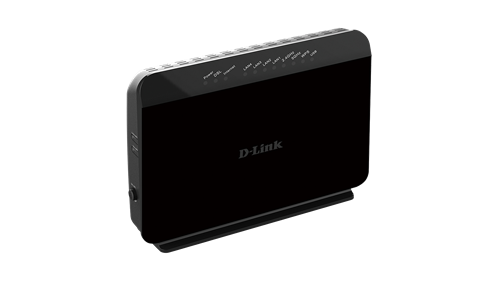
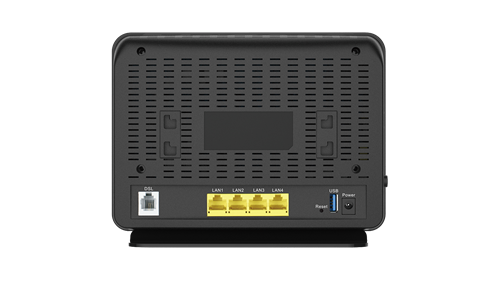
GO-DSL-AC750 (Mediatek MT751x)

Caratteristiche
High-Speed Connectivity
The latest 802.11ac wireless specification delivers blazing fast wireless connectivity with increased range and reliability
RJ11 ADSL port with built-in ADSL2+ modem
Four 10/100 Fast Ethernet LAN ports give you high-speed wired connectivity
Flexible Bandwidth
Concurrent dual-band wireless for combined connections of up to 750 Mbps¹
QoS engine to prioritise important traffic and deliver uninterrupted bandwidth
Setup and Management
Web browser-based setup and configuration
Setup wizard to guide you through the configuration process
Firewall and access control options to prevent attacks and restrict access to your network
Panoramica
The dlinkgo GO-DSL-AC750 Wireless AC Dual-Band ADSL2+ Modem Router is an affordable yet powerful all-in-one wireless networking solution which combines the latest high-speed 802.11ac Wi-Fi specification with dual-band technology, Fast Ethernet ports and built-in ADSL2+ modem to deliver a seamless Internet experience. The increased range and reliability of wireless AC technology reaches farther into your home, and the GO-DSL-AC750’s advanced security features keep your network and data safe from intruders.
High-Speed Wired and Wireless Connectivity
The GO-DSL-AC750 Wireless AC Dual-Band ADSL2+ Modem Router uses the latest high-speed wireless technology to bring you lightning-fast combined Wi-Fi speeds of up to 750 Mbps¹, and increased range. Enjoy streaming media, Internet phone calls, online gaming, and content-rich web surfing throughout your home. In addition, four Fast Ethernet ports give you solid, dependable wired performance for devices such as media centres and gaming consoles. The built-in Quality of Service (QoS) engine allows you to prioritise important traffic to ensure that your favorite applications are receiving optimal bandwidth.
Dual-Band Wireless for Seamless Performance
The GO-DSL-AC750 Wireless AC Dual-Band ADSL2+ Modem Router features dual-band wireless, allowing you to operate two concurrent, high-speed Wi-Fi bands for ultimate wireless performance. Surf the web, chat, and play online games on the 2.4 GHz band, while simultaneously streaming digital media on the 5 GHz band. What’s more, each band can operate as a separate Wi-Fi network, giving you the ability to customise your network according to your connectivity needs. You can even configure a guest zone to give visitors Internet access without giving them access to the rest of your network.
Easy to Set Up, Easy to Secure
Sharing your Internet connection doesn’t have to be a complicated process; just open a web browser to access the setup wizard and follow the easy step-by-step instructions to get started. Implement WPA/WPA2 wireless security in minutes with the wireless network setup wizard, or use Wi-Fi Protected Setup (WPS), which establishes a secure connection to new devices without the need to enter settings or create passwords. In addition, the built-in firewall protects against malicious attacks from the Internet, and access control features allow you to restrict access to your network.
Share a Storage Drive or Printer Easily
Connect a USB storage device to the GO-DSL-AC750 to create a shared storage space, making it easy to share music, movies and documents between computers and devices connected on your home network. Plug in a USB hard drive and access your library of videos and music from your laptop. You can even customise your shared storage space by creating separate accounts to control access to the USB drive, so you can share your music with everyone but keep your personal files private. You can also connect a USB multifunctional printer to share printing and scanning functions, allowing a single printer to be shared with an office or a household.
Specifiche
GENERAL
Device Interfaces
802.11 ac/n/g/b/a Wireless LAN
Four 10/100 LAN ports
RJ-11 ADSL port
USB 2.0 port
ADSL Standards
ADSL Standards:
- Multi-mode
- Full-rate ANSI T1.413 Issue 2
- ITU-TG.992.1 (G.dmt) Annex A/C/I
- ITU-TG.992.2 (G.lite) Annex A/C
- ITU-T G.994.1 (G.hs)
ADSL 2 Standards:
- ITU-T G.992.3 (G.dmt.bis) Annex A/J/K/L/M
ADSL 2+ Standards:
- ITU-T G.992.5 Annex A/L/M
ATM/PPP Support
Multiprotocol over AAL5 (RFC 1483/2684)
Bridged and routed Ethernet encapsulation
LLC encapsulation
VC-based multiplexing
ATM Forum UNI3.1/4.0 PVC (up to 8 PVCs)
ATM Cell Format ITU-T Rec. I.361
ATM Adaption Layer Type 5 (AAL5)
PPPoA (RFC2364)
PPPoE (RFC2516)
PPP Link Control Protocol (RFC 1661)
Internet Protocol Control Protocol (RFC 1332)
PPP Authentication Protocol (RFC 1334)
PPP Challenge Handshake Authentication Protocol (RFC 1994)
Microsoft PPP CHAP extensions (RFC 2433)
WLAN Specifications
Combine wireless speeds of up to 750 Mbps (300 Mbps + 433 Mbps)¹
Wi-Fi Protected Setup (WPS)
Multiple SSIDs
Automatic rate adapting
WAN scheduling
Auto channel selection
WMM support
64-bit & 128-bit WEP
WPA-PSK & WPA2-PSK
MAC address filtering
Network Services
IPv4
DHCP server/client/relay
DNS relay
Dynamic DNS (DDNS)
Routing Information Protocol (RIP) v1/v2
NAT AGLs:
- PPTP
- L2TP
- FTP
- RTSP (RealTime Streaming Protocol)
- SIP v1/v2
- IPsec
Internet Control Message Protocol (ICMP)
Virtual server (Port forwarding)
Simple Network Time Protocol (SNTP)
802.1d MAC Bridge (up to 256*8 MAC addresses)
QoS:
- IPP/ToS
- DSCP QoS in 4-priority queues
- Application QoS in 4-priority queues
- Strict priority
- VLAN QoS in 4-priority queues
- QoS remarking based on IPP/ToS, DSCP and 802.1p
- TOS transparency through NAT
- Mapping to queue according to DSCP bits and physical port
- 802.1Q
IGMP proxy v1/v2
IGMP snooping v1/v2/v3
Standards
IEEE 802.11ac/n/g/b/a
IEEE 802.3
IEEE 802.3u
Minimum System Requirements
Microsoft Internet Explorer 6 or higher, Firefox 1.0 or higher, Safari 1.2 or higher, or other Java-enabled browser
Ethernet network interface
Subscription with an Internet Service Provider (ISP)
FUNCIONALITY
Universal Plug and Play Support
UPnP based auto-configuration
UPnP based port forwarding
UPnP IGD 1.0
Security
Attack Prevention:
- Port scanning & illegal packet attack
- DoS Attack
- SYN Flooding
- Ping of Death
- Teardrop
- LAND attack
- IP Spoofing
- IP with zero length
- Smurf Attack
- TCP Null Scan
Stateful Packet Inspection (SPI)
Management Access Control for LAN/WAN sides
IP filtering
MAC filtering
URL filter
Demilitarised Zone (DMZ)
Device Management
Web configuration
Telnet management
Webpage/X-Modem/FTP/TFTP firmware upgrade
Diagnostic tools for ADSL and IP Ping
Setup wizard
Advanced Features
Multi-language web setup wizard
UPnP support
802.1p QoS
VPN pass-through/multi-session PPTP/L2TP/IPSec
Dual Active Firewall:
- Network Address Translation (NAT)
- Stateful Packet Inspection (SPI)
PHYSICAL
Dimensions
213 x 173.2 x 52 mm (8.3 x 6.8 x 2.0 inches)
Weight
320.2 grams (0.7 lbs)
Temperature
Operating: 0 to 40 °C (32 to 104 °F)
Storage: -20 to 65 °C (-4 to 149 °F)
Humidity
5 % to 95 % non-condensing
Certifications
CE
Wi-Fi
Wi-Fi Protected Setup (WPS)
¹ Maximum wireless signal rate derived from IEEE Standard 802.11 and draft 802.11ac specifications. D-Link makes no warranties as to forward compatibility with future standards or compatibility with draft 802.11ac devices from other manufacturers. Actual data throughput will vary. Network conditions and environmental factors, including volume of network traffic, building materials and construction, and network overhead, lower actual data throughput rate. Environmental factors may adversely affect wireless signal range.
Documentazione
Scheda tecnica (Updated April 2014)
Guida installazione v1.50 EU 20150514
Manuale utente: v1.03 20140412, v1.04 20150515 (Remove 3G WAN)
Software
D-Link Link'n Print (ex SharePort) per Windows & MacOS
D-Link Apps
D-Link SharePort Mobile App
D-Link SharePort Software Utility
Codice sorgente GPL GO-DSL-AC750 T1 1.02 EU
Firmware
GO-DSL-AC750 T1 1.08 EU 20161129 con nota edizione
Istruzioni per l'aggiornamento
• Reimpostare (reset) i parametri di configurazione preselezionati (default) nel firmware corrente del dispositivo tramite l'apposito tasto
• Disabilitare eventuali firewall/antivirus
• Collegare il dispositivo via cavo LAN Ethernet con connettore RJ45 alla scheda di rete del PC
• Assegnare manualmente un IP fisso (assolutamente NO DHCP!) nelle impostazioni della scheda di rete
• Si consiglia di utilizzare Internet Explorer
• Nella configurazione via browser MANTEINANCE>Firmware Update scegliere il firmware scompattato e avviare l'aggiornamento
• Quando l'aggiornamento è completato reimpostare (reset) i parametri di configurazione preselezionati (default) nel nuovo firmware del dispositivo tramite l'apposito tasto
Approfondimenti
Accesso chiavetta USB a cura di massbiag & Dan13
Supporto internazionale D-Link
Pagina prodotto: Italia
Sito FTP: Europa, Germania, Polonia
Supporto Tecnico: Taiwan TSD, Italia, Germania


