D-Link DIR-615
instradatore senza fili 802.11n 300 Mbps
Revisione Hardware: Bx (Ubicom IP5090U), Dx (Ralink RT3052), Hx (Ralink RT3352), Qx (Realtek RTL8196E)
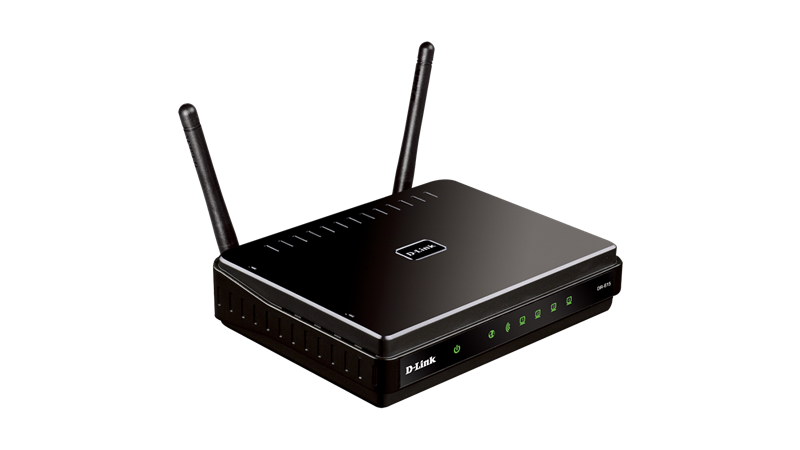
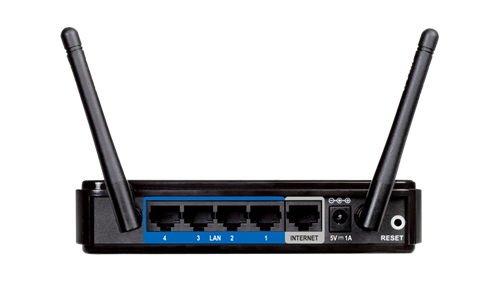
DIR-615 Qx (Realtek RTL8196E)

Particolarità
Total Compatibility
Works with any Wi-Fi certified device, so your older wireless devices will connect without hassle, giving you peace of mind and performance
Total Security
Complete set of security features including an SPI firewall and Wi-Fi Protected Access to shield your network from intruders
Total Simplicity
Setup wizard and Wi-Fi Protected Setup (WPS) make it easy to set up a home network and connect new devices
Caratteristiche
Connectivity
• Wireless N technology offers increased speed and range over 802.11g/b standards¹.
• Ethernet LAN and WAN ports let you connect via a wired or wireless connection
• UPnP support facilitates the discovery of other devices on your network
Security
• Built-in Stateful Packet Inspection (SPI) firewall protects your network from malicious attacks
• Wi-Fi Protected Access (WPA/WPA2) prevents intruders from gaining access to your network
Compatibility
• Backward compatible with all your older Wi-Fi certified devices
• IPv6 support helps ensure that your network is future-proof
Ease of Use
• Intuitive setup wizard to speed up initial configuration
• Wi-Fi Protected Setup (WPS) configures security features at the push of a button
Panoramica
Easily set up a fast, reliable, and secure wireless home network with the DIR-615 Wireless N Home Router. The setup wizard gets you up and running in no time, and with the push of a button your network will be protected from unwanted intruders. The DIR-615 is both backward and forward compatible so that you can share your Internet connection without any hassles.
High-Speed Wireless Networking
Create a high-speed wireless network for your home using the D-Link DIR-615 Wireless N Home Router. Connect the DIR-615 to a broadband modem and wirelessly share your high-speed Internet connection to enjoy surfing the web, checking e-mail, and chatting with family and friends online. The router uses Wireless N technology, which offers increased speed and range over 802.11g/b standards. Now you can experience reliable wireless connections from farther away, while also having the flexibility of connecting wired computers to the network.
Securing Your Wireless Network
The DIR-615 includes a built-in firewall that safeguards your network, allowing you to use the Internet without worrying about harmful attacks from the outside. It minimizes the threats of hackers and prevents intruders from entering your network. The DIR-615 supports Wi-Fi Protected Access (WPA and WPA2) to keep your network traffic secure, so you have complete control over exactly who is able to access your network.
Easy Installation
Set up the DIR-615 Wireless N Home Router in minutes using our intuitive Setup Wizard. The wizard will guide you through an easy-to-follow process to help you install your new hardware and successfully create your network. With the DIR-615 you’ll be browsing the web, making calls over the Internet, playing online games, and sharing content in no time.
Compatibility Assurance
The DIR-615 provides a high-speed connection to other 802.11n devices and is backward compatible with 802.11b/g, ensuring compatibility with a
wide range of wireless devices. The DIR-615 includes four Ethernet ports for connecting Ethernet-enabled PCs, print servers, or other devices. In addition, the DIR-615 is Wi-Fi Protected Setup (WPS) certified, making it even easier to securely configure your wireless network.
IPv6 Ready
The DIR-615 Wireless N Home Router is certified as IPv6 Ready, signifying that it not only supports the future IPv6 protocol, but is also compatible with
IPv6 equipment from other manufacturers, so you can be assured that your equipment is forward and backward compatible.
Specifiche
General
Device Interfaces
• Four 10/100 LAN Ports
• One 10/100 WAN Port
Antennas
• Two fixed external 2 dBi omni-directional antennas
Data Signal Rate
• 2.4 GHz
• Up to 300 Mbps¹
System Requirements
• Cable or DSL modem with Ethernet port
• An installed Ethernet adapter
• Internet Explorer 6 or Firefox 2.0 or higher
• Computer with Windows XP SP2, Windows Vista, Windows 7, or Mac OS X (v10.3/v10.4), or Linux-based Operating System
Functionality
Security
• WEP 64/128-bit data encryption
• Wi-Fi Protected Access (WPA/WPA2)
• WPS
Advanced
• UPnP support
• Multi-language web setup wizard
Firewall Features
• Network Address Translation (NAT)
• Stateful Packet Inspection (SPI)
• MAC address filtering
• URL filtering
Status LEDs
• Power
• Internet status
• WLAN
• LAN
Mobile App Support
• QRS Mobile
Physical
Dimensions
• 148 x 113 x 32 mm (5.8 x 4.4 x 1.3 inches)
Weight
• 214 grams (0.47 lbs)
Power
• Input: DC 5 V/1 A
Temperature
• Operating: 0 to 40 °C (32 to 104 °F)
• Storage: -20 to 65 °C (-4 to 149 °F)
Humidity
• Operating: 0% to 90% non-condensing
• Storage: 5% to 95% non-condensing
Certifications
• WHQL
• Wi-Fi
• IPv6
• CE²
¹ Maximum wireless signal rate derived from IEEE standard 802.11n specifications. Actual data throughput will vary. Network conditions and environmental factors, including volume of network traffic, building materials and construction, and network overhead, lower actual data throughput rate. Environmental factors will adversely affect wireless signal range.
² For the EU region, this product is compliant with CE regulations and operates within the following frequency range: 2.4 - 2.4835 GHz.
D-Link Corporation Datasheet. Updated 2016/06/22
Documentazione
Rev. H/W: Bx
Scheda tecnica
Guida installazione
Manuale utente
Rev. H/W: Dx
Scheda tecnica
Guida installazione
Manuale utente
Rev. H/W: Hx
Scheda tecnica
Guida installazione
Manuale utente
Rev. H/W: Qx
Scheda tecnica
Guida installazione
Manuale utente
Firmware
Rev. H/W: Bx
Rev. Bx: Versione 2.27 (Build 01 Beta 02) 20100526 con nota edizione
Rev. H/W: Dx
Rev. Dx: Versione 4.14 (Build 04) 20131011 con nota edizione
Rev. Dx: Versione 4.14 (Build 03) 20130913 con nota edizione cumulativa
Rev. H/W: Hx
Rev. Hx: Versione 8.05 (Build 05) 20130703 con nota edizione cumulativa
Pacchetto lingua Italiano Versione 1.0 (Build 06)
Rev. H/W: Qx
Rev. Qx: Versione 17.03 (Build 01) 20151112
Pacchetto lingue
Uso del pulsante REIMPOSTAZIONE (RESET) DIR-615 Dx
Fonte D-Link UK
There are various ways of resetting your router. If you cannot access the web user interface, a 'reset' button is situated on the back of most devices.
Here are instructions to reset your device to default factory settings. Start with option 1, then 2 or 3 if not successful.
Option 1, "Soft Reset"
This will remove custom settings, but keep existing firmware
In the web user interface, there is an option in TOOL-> SYSTEM, to set the router back to factory default settings.
Option 2, "Hard Reset"
This will remove custom settings, but keep existing firmware
While power is ON, press and hold the 'reset' button on the back of your router for 10 seconds. Use a sharp object eg. a paperclip or a pen. Then release the button and wait until device restarts.
Option 3, "Crash Reset"
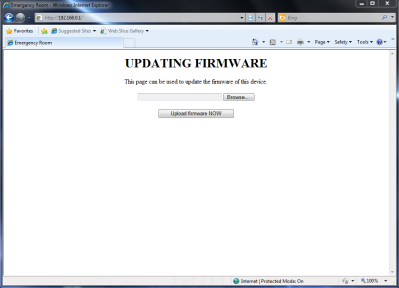
This will remove the current firmware. Next time you try to login, a message will show up, asking your for a firmware file/image.
Power OFF the device. Press and hold the 'reset' button; while doing so, power on the device again and keep holding the 'reset' button for another 10 seconds. Then release the button and wait until device restarts.
DIR-615 Emergency Room (ambiente di emergenza)
Firmware alternativi

Rev. H/W: Dx (Ralink RT3052) & Hx (Ralink RT3352)
DD-WRT Wiki: D-Link DIR-615 rev D2
DD-WRT Wiki: D-Link DIR-615 rev D3
DIR-615 D3 come repeater DD-WRT
DIR-300 A1/B1: modalità Repeater con DD-WRT
DD-WRT: attivare i 300 Mbps a partire dalla r16994

Rev. H/W: Dx (Ralink RT3052) & Hx (Ralink RT3352)
OpenWrt Wiki: D-Link DIR-615

Rev. H/W: Dx
Guida installazione firmware a cura di a_big_friend
Approfondimenti
Connettere il router a internet mediante modem, altro router, HAG Fastweb
Adding a Serial Port to a D-LINK DIR-615 A1
Blogspot - Dlink DIR-615
WikiDevi - DIR-615 rev B2
WikiDevi - DIR-615 rev D
WikiDevi - DIR-615 rev H1
WikiDevi - DIR-615 rev Q2
Supporto internazionale D-Link
Pagina prodotto: Italia
Server FTP: Europa, Germania, BcnLab, Temp
Supporto Tecnico: Taiwan TSD, USA, Canada


