D-Link DIR-880L
instradatore senza fili 802.11ac 1900 a doppia banda simultanea
(600 Mbps su 2,4 GHz + 1300 Mbps su 5 GHz)
con tecnologia a nuvola

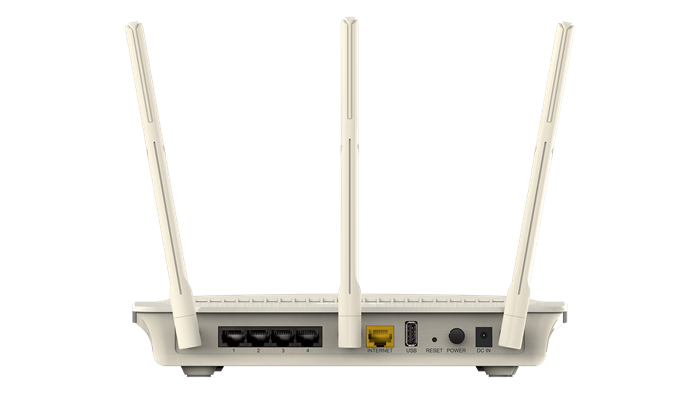
DIR-880L A1 (Broadcom BCM4708A0)

Particolarità
Ultimate Wireless Speed
Revolutionary Wireless AC1900 technology provides combined wireless speeds of up to 1.9 Gbps¹
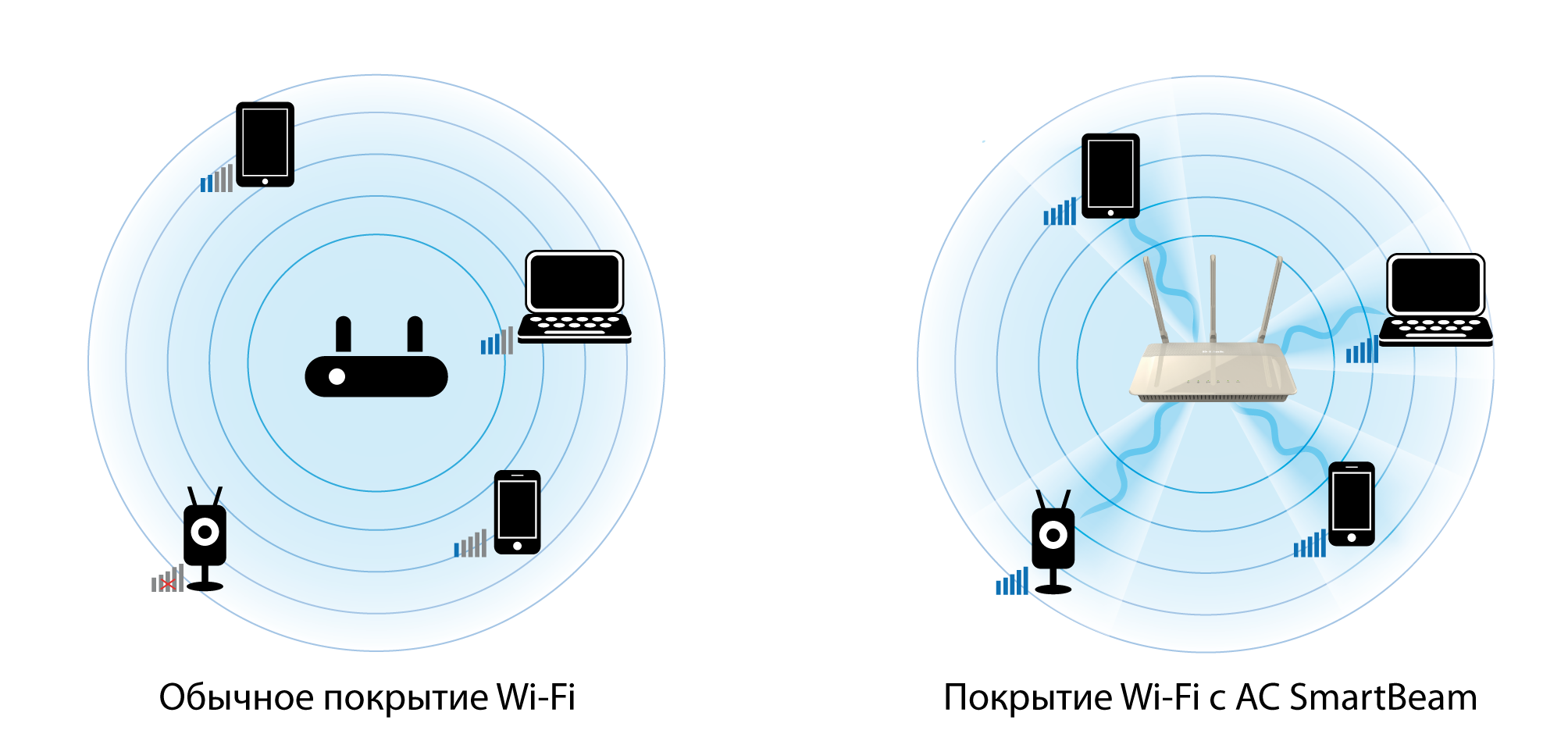
Extended Coverage with Advanced AC SmartBeam™
Dramatically improves the wireless range, allowing you to watch HD movies, transfer files and browse the Internet with more devices, simultaneously
mydlink™-Enabled
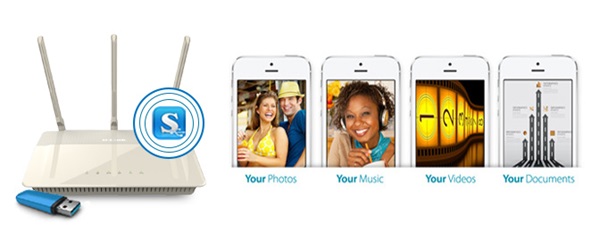
Control and managed your network wherever you are over the Internet, as well as stream and share media files through the free mydlink™ SharePort™ app
Easy Set Up and Installation
• Web-based touch screen enhanced setup wizard and configuration allows you to set up your network without turning on a computer
Caratteristiche
Connectivity
• Combined dual-band wireless speeds of up to 1.9 Gbps¹
• Advanced AC SmartBeam™ dramatically enhances wireless signal strength and throughput
• 802.11 a/b/g/n/ac wireless LAN for a complete range of wireless compatibility
• Gigabit WAN and LAN ports for high-speed wired connections
• Two USB ports (1 x USB 3.0, 1 x USB 2.0) to connect storage drives and printers for sharing
mydlink™-enabled
• Remotely and securetly view and manage your network over the Internet
• mydlink™ Lite mobile app helps you access, manage and view your network remotely
Advanced Quality of Service (QoS)
• Band steering efficiently balances the data load between the two wireless bands
• Airtime fairness optimally adjusts the data rate of wireless clients for the best performance
Security
• WPA & WPA2 wireless encryption protects the network from intruders
• Wi-Fi Protected Setup (WPS) securely adds devices to your network at the push of a button
Firmware alternativi a sorgente aperta (open source) [Da sito AU adattamento]
Gli utenti avanzati hanno la possibilità di modificare ulteriormente il proprio router utilizzando firmware alternativi a sorgente aperta come DD-WRT. L'installazione di firmware personalizzato annulla la garanzia del prodotto e viene effettuata a proprio rischio. Per maggiori informazioni visita Supporto DD-WRT Beta. Scarica il firmware qui.
Panoramica
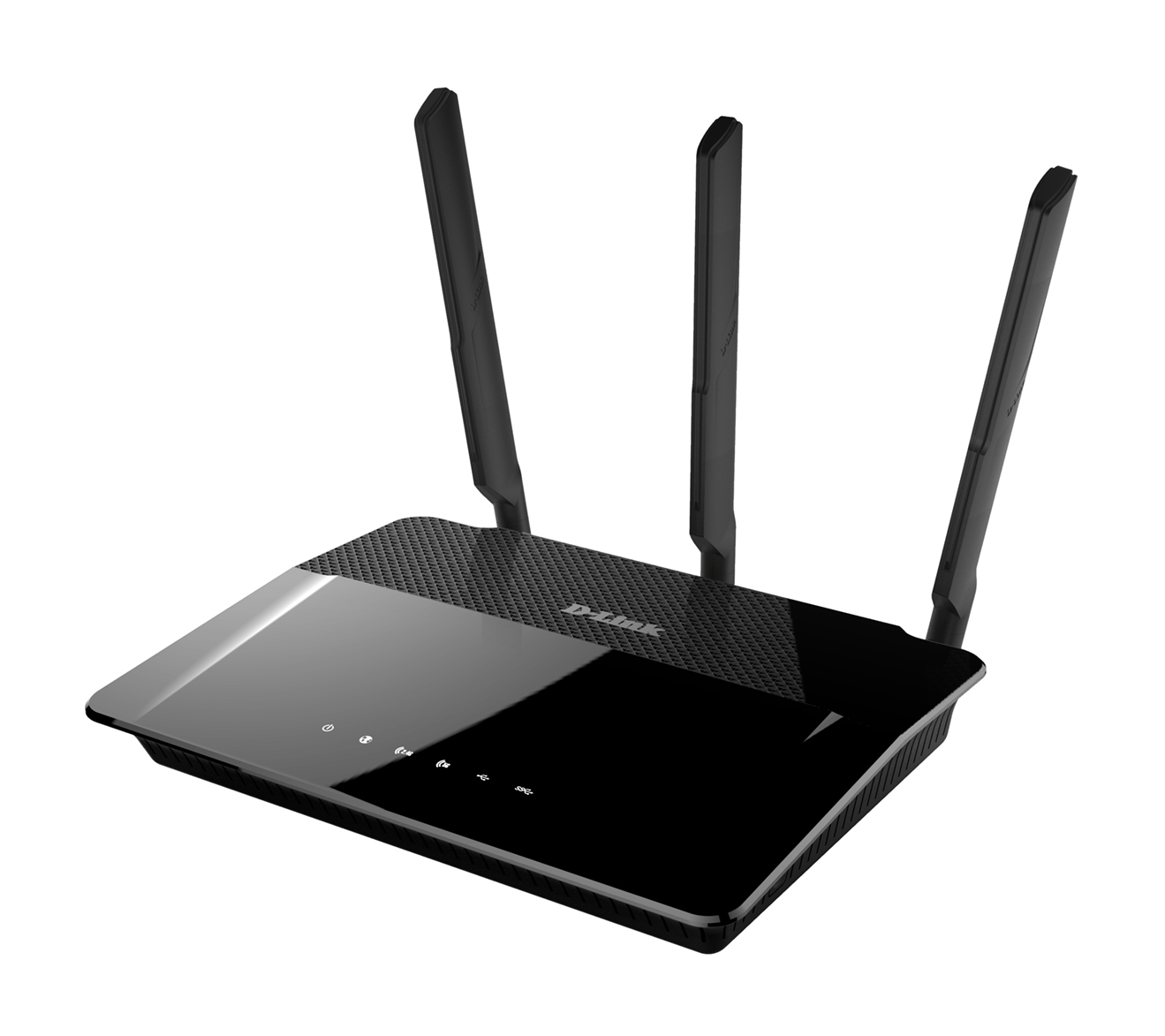
The DIR-880L Wireless AC1900 Dual-Band Gigabit Cloud Router offers the ultimate wireless connectivity with combined wireless speeds of up to 1.9 Gbps¹. Advanced AC SmartBeam™ provides a dramatic increase in wireless coverage, while advanced Quality of Service (QoS) efficiently and automatically distributes your Internet bandwidth. The touch screen enhanced web-based setup wizard and configuration allows you to easily setup and get connected. It’s mydlink™-enabled which allows you to control and manage your network wherever you are over the Internet, as well as stream and share media files through the free mydlink™ SharePort™ app. The DIR-880L is high performance, easy-to-use and IPv6-ready for a reliable network today and tomorrow.
Superior Coverage and Speed with Advanced AC SmartBeam™
The D-Link DIR-880L Wireless AC1900 Dual-Band Gigabit Cloud Router creates a blazing fast home network that connects all of your devices to your broadband Internet connection. Advanced AC SmartBeam™ technology brings you the future of high-bandwidth wireless connectivity, vastly increasing the speed and coverage of your network. This allows you to stream HD video, make Internet calls, and surf the Internet from every corner of your home without interruption. The high-gain external antennas send the signal into the furthest corners of your home, giving you a strong connection wherever you are. Gigabit Ethernet ports provide high-speed wired connections for up to four PCs or other devices.
Use mydlink™ to Monitor Your Network
The Wireless AC1900 Dual-Band Gigabit Cloud Router is mydlink™ Cloud enabled, so you can effortlessly access and view your network no matter where you are. See who is connected to your router, change settings, or block someone from using your network connection, all from an Internet connected PC, tablet, or smartphone. Parents can monitor what sites their children are visiting, to stay informed and in control on the go.
File Sharing at Your Fingertips
The mydlink™ SharePort™ app allows you to connect a USB storage device to the DIR-880L and instantly share documents, movies, pictures, and music with mobile devices. Put your music library on a USB drive and share it with everyone else in your home, or show photos on the living room TV while a family member watches a movie on their tablet. Stream media files to multiple devices without interruption, or save them to your device for offline playback. The intuitive interface lets anyone immediately connect to a variety of entertainment options stored securely on your own storage device.
Reliable and Efficient
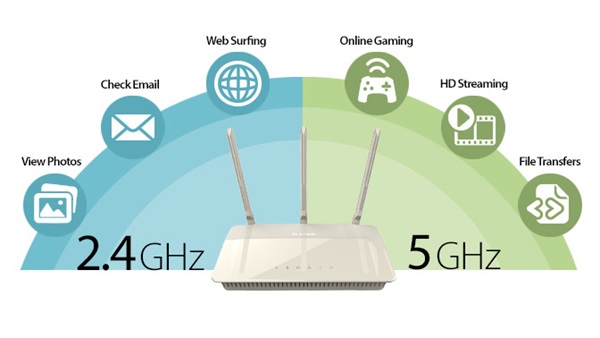
Using the latest Wireless AC technology, which can provide transfer rates of up to 1.9 Gbps1 (1300 + 600 Mbps), the DIR-880L operates on both the 2.4 GHz and 5 GHz wireless bands at the same time using concurrent dual-band technology and three external antennas. This allows you to browse the web, chat and e-mail using the 2.4 GHz band, while simultaneously streaming digital media, playing online games, or making Internet phone calls on the 5 GHz band. Advanced Quality of Service (QoS) prioritises the most important data, such as movie streaming and online gaming; its band steering feature efficiently balances the data load between the two bands, while airtime fairness ensures that wireless clients are provided with the most appropriate bandwidth for their needs.
Easy to Set Up and Use
Get the DIR-880L up and running in no time right from your sofa with the touch screen enhanced web-based setup wizard. Simply open the web browser on your smartphone or tablet to setup and follow a few easy steps to get your home network connected without having to switch on a computer. You can also set up a secure network with the touch of a button using Wi-Fi Protected Setup. Simply press the WPS button to instantly establish a secure connection to a new device. If you have additional mydlink™ cloud products, you can take advantage of mydlink™ Zero Configuration. Simply connect your mydlink™-enabled device to the DIR-880L and the router will automatically link it to your mydlink™ account with no configuration required.
Specifiche
Device Interfaces
• 802.11 a/b/g/n/ac wireless LAN
• Four 10/100/1000 Gigabit LAN ports
• 10/100/1000 Gigabit WAN port
• Two USB ports (one USB 3.0, one USB 2.0)
Antenna Type
• Three dual-band dipole antennas
Standards
• IEEE 802.11ac
• IEEE 802.11n
• IEEE 802.11g
• IEEE 802.11b
• IEEE 802.11a
• IEEE 802.3
• IEEE 802.3u
Minimum System Requirements
• Windows 8/7/Vista/XP SP3 / Mac OS X 10.4 or higher
• Microsoft Internet Explorer 6 or higher, Firefox 1.5 or higher, or other Java-enabled browser
• Ethernet network interface
• Cable or DSL modem
• Subscription with an Internet service provider
Advanced Features
• Guest zone
• mydlink™ SharePort™ web access
• Multi-language web setup wizard
• Green Ethernet
• DLNA media server support
• Advanced AC SmartBeam™
• Bridge mode
• Dual active firewall: Network Address Translation (NAT) & Stateful Packet Inspection (SPI)
• VPN passthrough/multi-session PPTP/L2TP/IPSec
• Advanced QoS with band steering
• VPN server - L2TP over IPSec
mydlink™ Features
• Remote Management
• View current upload/download bandwidth
• View currently connected clients
• View web browsing history per client
• Block/unblock client network access
• Manage wireless network details
• Accessible through a web browser or iOS or Android mobile app
Mobile App Support
• mydlink™ Lite
• mydlink™ SharePort™
• QRS Mobile v1.5
Wireless Security
• WPA & WPA2 (Wi-Fi Protected Access)
• Wi-Fi Protected Setup (WPS) PIN/PBC
Dimensions (L x W x D)
• 246.9 x 190.4 x 47.2 mm (9.72 x 7.50 x 1.86 inches)
Weight
• 745 grams (1.62 lbs)
Power
• Input: 100 to 240 V AC, 50/60 Hz
• Output: 12 V DC, 3 A
Temperature
• Operating: 0 to 40 °C (32 to 104 °F)
• Storage: -20 to 65 °C (-4 to 149 °F)
Humidity
• Operating: 0% to 90% non-condensing
• Storage: 5% to 95% non-condensing
Certifications
• FCC Class B
• CE Class B
• C-Tick
• DLNA
• IPv6 Ready
• Wi-Fi Certified
• Wi-Fi Protected Setup (WPS)
• Wi-Fi Multimedia (WMM)
• Compatible with Windows 8
¹ Maximum wireless signal rate derived from IEEE standard 802.11ac (draft) specifications which are subject to change. Actual data throughput will vary. Network conditions and environmental factors, including volume of network traffic, building materials and construction, and network overhead, lower actual data throughput rate. Environmental factors may adversely affect wireless signal range.
D-Link European Headquarters Datasheet updated March 2014
Documentazione
Scheda tecnica: EU marzo 2014, US maggio 2015
Guida installazione: V1.01 IT 20140603, V1.02 EU 20150515
Manuale prodotto: V1.04 EU 20160506
Domande frequenti (Frequently Asked Questions - FAQ)
D-Link IT
D-Link SG
D-Link LA
D-Link Blog CC
Visuale esterna del prodotto in 3D a 360°
Prospettiva 1 [Come aprire file SWF]
Prospettiva 2
Emulatore
H/W:A1 F/W:1.07 2016-02-26
Software
App D‑Link IT
App mobile mydlink IT
D-Link Apps EN
IFTTT EN
IFTTT: dlink, mydlink
Programmi di utilità/App SharePort & SharePort Plus
Repositorio
Codice sorgente GPL
Firmware
WORLDWIDE (Mondiale)
DIR-880L Ax 1.21 build 01 20200518 con nota edizione
DIR-880L Ax 1.20 build 02-01_k27e 20200207 con nota edizione cumulativa + firmware intermedio & istruzioni per la transizione
DIR-880L Ax 1.20_BETA build 01-02_j4cj 20190412
DIR-880L Ax 1.20_BETA build 02-01_icl9 20181221 con nota edizione
DIR-880L Ax 1.20_BETA build 01_i4ha 20180417 con firmware intermedio per la transizione
DIR-880L Ax 1.20 build 01-01_i3se 20180328 con nota edizione cumulativa + firmware intermedio & istruzioni per la transizione
DIR-880L Ax 1.08_BETA build 06-02 20180124 con nota edizione + firmware intermedio & istruzioni per la transizione
DIR-880L Ax 1.08 build 04-01 20161027 con nota edizione cumulativa (ultimo firmware NON CRIPTATO da usare per il RECOVERY)
Supporto internazionale D-Link
Pagina prodotto: Italia, Medio Oriente, Iran, Mongolia, Singapore, Australia
Sito FTP: Europa, Germania, Russia, Australia, Canada, USA, US-SEC_ADV, Singapore
Supporto Tecnico: TW TSD, IT mydlink, Taiwan, Canada, USA Legacy
