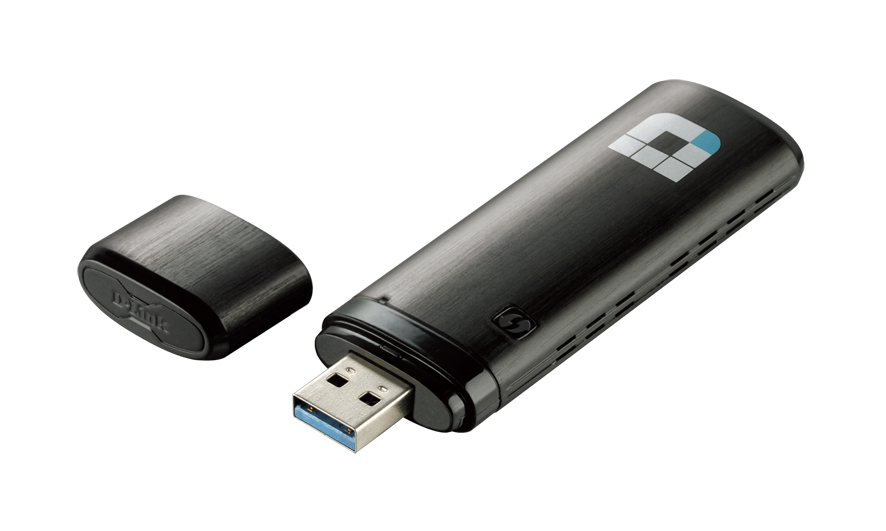
D-Link DWA-182
adattatore USB senza fili 802.11ac 1200 a doppia banda simultanea
(300 Mbps su 2,4 GHz + 867 Mbps su 5 GHz)
H/W Ver.: A1, C1
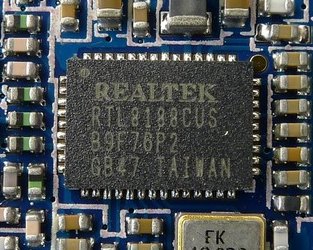
DWA-182 C1 (Realtek RTL8812AU)


Particolarità
Super-fast Wireless AC
Delivers Dual Band connectivity for blazing-fast, interference-free bandwidth
Simple Setup
Quickly and easily establish a fast, secure home network that will have you browsing, streaming, and chatting in minutes
Total Wireless Compatibility
Backwards compatible with all of your current wireless products
Caratteristiche
Dual Band 802.11ac Wireless Technology
• Fully utilize the power and speed of your Wireless AC network
• Dual Band technology offers flexibility and versatility depending on your connectivity needs
• Latest Wireless AC technology delivers maximum performance and reliability
• USB 3.0 support maximizes data transfer speeds for compatible devices
Total Wireless Security
• Connect to wireless networks securely using the latest encryption methods
• Supports WPA2 encryption for high-level wireless security
• Use Wi-Fi Protected Setup to establish a secure connection with the press of a button
Compact and Portable
• Take the power of Wireless AC with you wherever you go
• Instantly adds Wireless AC capabilities to any computer with a USB port²
• On-board diagnostic LED shows connection status
Descrizione
The DWA-182 Wireless AC1200 Dual Band USB Adapter delivers powerful wireless AC technology to your desktop or notebook computer. Simply plug the adapter into an available USB port and connect to a wireless network to access a secure, high-speed Internet connection over the 2.4 GHz (300 Mbps) or 5 GHz (up to 867 Mbps) bands¹. In addition, with integrated Dual Band technology, you’ll have reduced Wi-Fi interference to maximize throughput for faster streaming, gaming, and VOIP calls.
Interference-Free Bandwidth
The DWA-182 Wireless AC1200 Dual Band USB Adapter delivers Dual Band technology to your home network for intelligent, versatile, interference-free bandwidth. Check your email and surf the Internet on the 2.4 GHz band; or play online games, make Skype calls, and stream HD movies to multiple devices using the cleaner, interference-free 5 GHz band. Whatever you like to do online, Dual Band has you covered.
Easy WPS Push-Button Setup
Use Wireless Protected Setup (WPS) to quickly and easily establish a highly secure home network that will have you browsing, streaming, and watching in minutes. The latest encryption technology ensures that information transmitted on your network remains safe and secure, while preventing unauthorized access. It’s as easy as push and connect!
Compatible With All Your Wireless Products
While the Wireless AC1200 Dual Band USB Adapter delivers cutting-edge 802.11ac speed to your home network, it’s also backward compatible with all of your current wireless products – no updates or adapters necessary.
USB 3.0 for Maximum Data Transfer Speeds
The DWA-182 also supports the latest high-speed USB 3.0 specification. When connected to a compatible USB 3.0 device and using the 5 GHz wireless band, the device will automatically switch to USB 3.0 mode, allowing you to achieve the highest possible data transfer rates and fully utilize the speed benefits of the Wireless AC standard.
What is wireless AC?
802.11ac is a new networking standard that produces high-throughput wireless speeds on the 5GHz band. What does this mean for your home network? Flawless HD video streaming, faster gaming, and lag-free VOIP and video calls, all with less Wi-Fi interference for smooth, lightning-fast performance. What’s more while your computer gains all the cutting-edge benefits of 802.11ac, the DWA-182 is also backwards compatible with all of your current wireless n/g/b products.
Specifiche
General
Diagnostic LED
• Activity
Security
• Wi-Fi Protected Access (WPA™ & WPA2™)
• Wi-Fi Protected Setup - PIN & PBC
Standards
• IEEE 802.11ac (Draft)
• IEEE 802.11n
• IEEE 802.11g
• IEEE 802.11b
• IEEE 802.11a
Antenna Type
• Integrated Antenna
Requirements
Operating System
• Windows 8/7/Vista/XP SP3
Compatible Browsers
• Internet Explorer® v7 or Mozilla® Firefox® v3.0
Interface
• Available USB Port
• Supports USB 3.0 standard (optional)
Physical
Dimensions
• 96.7 x 28.6 x 11.5 mm (3.81 x 1.13 x 0.45 inches)
Weight
• 16.65 grams (0.59 ounces)
Power
• Power Consumption:
- 450 mA (USB 2.0)
- 510 mA (USB 3.0)
• Operating Voltage: 5.0 V DC ±10%
Temperature
• Operating: 0 to 40 °C (32 to 104 °F)
• Storage: -20 to 75 °C (-4 to 167 °F)
Humidity
• 10% to 90% (non-condensing)
• 5% to 95% (non-condensing)
Certifications
• FCC Class B
• IC
• CE
• C-Tick
• Wi-Fi Certified
• Wi-Fi Protected Setup
Order Information
Part Number
DWA-182
Description
Wireless AC1200 Dual Band USB Adapter
¹ Maximum wireless signal rate derived from draft IEEE 802.11ac specification and IEEE Standard 802.11n specification. D-Link makes no warranties as to forward compatibility with future standards or compatibility with draft 802.11ac devices from other manufacturers. Actual data throughput will vary. Network conditions and environmental factors, including volume of network traffic, building materials and construction, and network overhead, lower actual data throughput rate. Environmental factors may adversely affect wireless signal range. Up to 867 Mbps wireless speeds achieved when connecting to other 802.11ac devices. Data throughput may also be limited by the product’s interface, less than 480 Mbps for a USB 2.0 interface. The inclusion of a specific product or manufacturer does not imply its endorsement of D-Link or the D-Link product. Computer must adhere to Microsoft’s recommended System Requirements.
² Using a USB 1.1 port will affect device performance. USB 2.0 port or higher recommended.
All references to speed and range, including the performance chart, are for comparison purposes only. Product specifications, size, and shape are subject to change without notice, and actual product appearance may differ from that depicted on the package. See inside package for warranty details.
D-Link C1 Datasheet Updated 02/08/2013

DWA-182 A1 (Broadcom BCM43526)
Documentazione
H/W Ver.: A1
Scheda tecnica
Guida installazione
Manuale utente
H/W Ver.: C1
Scheda tecnica
Guida installazione
Manuale utente
Driver D-Link
H/W Ver.: A1 (Broadcom)
Windows
DWA-182 A1 V1.04b02 2015/10/20 (Win XP/7/8/8.1-64 v6.30.145.30 2013/02/28 & Vista-64 v6.31.145.1 2013/03/07) con nota edizione cumulativa
DWA-182 A1 V1.03s0035 2015/02/05 (Win XP/7/8/8.1-64 v6.30.145.30 2013/02/28 & Vista-64 v6.31.145.1 2013/03/07) con nota edizione cumulativa
DWA-182 A1 V1.02s0032 2014/04/02 (Win XP/2K/8/-64 v6.30.145.30 2013/02/28 & Vista-64 v6.31.145.1 2013/03/07 & 7-64 v6.30.145.48 2013/09/09) con nota edizione cumulativa
DWA-182 A1 V1.02s0030 2013/07/10 (Win XP/2K/7/8-64 v6.30.145.30 2013/02/28 & Vista-64 v6.31.145.1 2013/03/07) | Nota edizione
DWA-182 A1 V1.01s0029 2013/06/06 (Win XP/2K/7/8-64 v6.30.145.30 2013/02/28 & Vista-64 v6.31.145.1 2013/03/07) | Nota edizione
DWA-182 A1 V1.01s0023 2012/11/15 (Win XP/2K/7/8-64 v6.30.145.9 & Vista-64 v6.31.65.1)
DWA-182 A1 V1.01s0020 2012/09/19 (Win XP/2K/7-64 v6.30.61.21 2012/07/31 & Vista-64 v6.31.65.1 2012/08/01) | Nota edizione
DWA-182 A1 V1.00s0013 2012/08/14 (Win XP/2K/7-64 v6.30.61.21 2012/07/31)
Mac
DWA-182 A1 V1.03 MAC (20170306)
H/W Ver.: C1 & D1 (Realtek)
Windows
DWA-182 D1 V4.02b01 eu (20180712) <- New (correzione del bug KRACK WPA2)
DWA-182 C1 V3.09b01 eu (20180817) <- New (correzione del bug KRACK WPA2)
DWA-182 C1 & D1 V4.01B01 20180316
DWA-182 C1 V3.07b05 2017/11/14
DWA-182 C1 V3.06b04 2016/01/21 (Win XP/Vista/7/8/8.1/10-64 v1030.2.731.2015 2015/10/29) con nota edizione cumulativa
Mac
DWA-182 C1 V1.04b03 MAC BETA 2017/12/15 con nota edizione cumulativa
DWA-182 C1 V1.03b01 UI 5.0.3 2017/01/12 (Mac OS 10.8/9/10/11/12 v1830.10) con nota edizione cumulativa
Linux
DWA-182 C1 (RTL8812AU) v4.3.2_11100.20140411 2014/05/28 | Nota edizione
Altri driver
H/W Ver.: A1 (Broadcom)
Windows
NETGEAR A6200 Standalone Installer (Win 9x/2K/XP/Vista/7-64 v6.32.145.1 2014/03/26)
H/W Ver.: C1 (Realtek)
Windows
Realtek multibrand Edimax Installer (Win XP/Vista/7/8/8.1/10-64 v1030.13.704.2016 2016/12/19)
Approfondimenti
WikiDevi: DWA-182 rev A1
WikiDevi: DWA-182 rev C1
HKEPC Hardware: DWA-182 A1
HKEPC Hardware: DWA-182 C1
CMDReview: DWA-182 C1
Broadcom BCM43526
WikiDevi: BCM43526 9 devices
Realtek RTL8812AU DataSheet
Microsoft Virtual WiFi Miniport Adapter: disattivazione
Supporto internazionale D-Link
Pagina prodotto: Italia, Australia, Russia
Sito FTP: Europa, Germania, Polonia, Francia, Svezia, Temp, Russia, Sud Africa, Singapore, Australia, Canada, USA, America Latina
Supporto Tecnico: Taiwan TSD